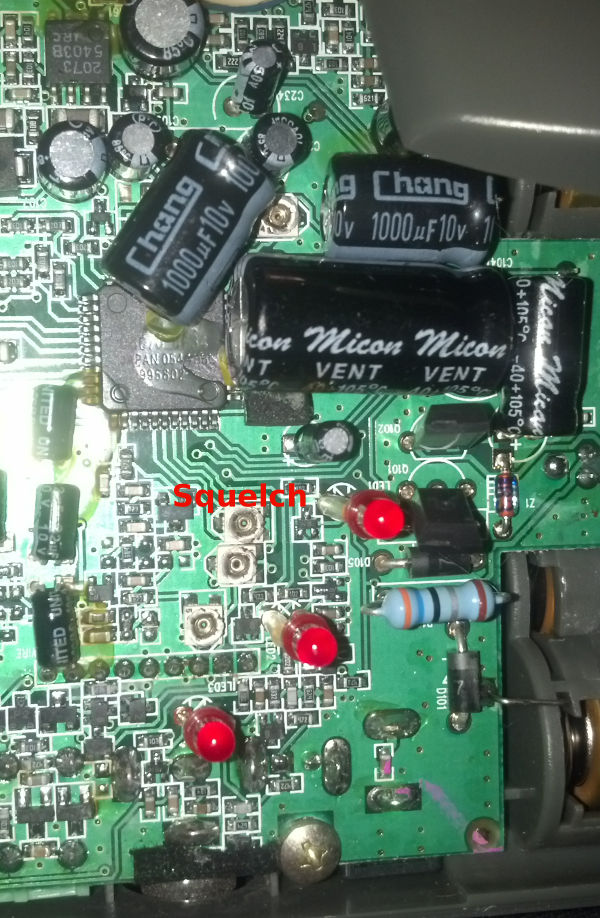
The circa 1999 intercoms at 900 MHz from Radio Shack (model 43-3102, FCC ID AAO4303102) are long range, reliable intercoms operating with wideband FM analog modulation.
Several hundred feet range between intercoms is possible with 2 milliwatts RF output and wideband 75 kHz FM modulation yielding audio frequency Response (–3 dB Bandwidth) of 300 Hz - 10 kHz
These intercoms are specified at -109 dBm 20 dB SINAD sensitivity (very good) and up to 200 feet range per the manual.
In practice they might reach 500 feet range with line of sight (placed near windows, not blocked by metal structures).
Intercom squelch is set a bit too tight from the factory, which reduces range.
The CTCSS/PL squelch system (10 kHz deviation) uses several of the same subaudible tone frequencies as standard two-way radios.
The user can select between 23 = 8 CTCSS tones and 22 = 4 channels.
The intercom will only open the squelch if matching correct channel and subtone are detected with adequate RF signal strength.
Correctly lowering the squelch threshold allows weaker RF signals to be heard.
For this intercom, the squelch potentiometer makes the squelch “tighter” with counterclockwise turning and “looser” with clockwise turning.
On this intercom, when the squelch is open (but with no/incorrect CTCSS) the middle RX LED will flicker once per second.
When the squelch is set just tight enough to stop the RX LED from flashing with no incoming RF signal, the RF RX sensitivity is maximum (maximum range).
If the squelch threshold is set too low, there can be occasional bursts of static (CTCSS false decode).
Also, for battery operated intercoms, the battery consumption will be higher if the squelch is always open as it’s trying to find the CTCSS tone constantly, putting the receiver into full power drain.
Matlab default behavior, which Mathworks says is currently not changeable, is to put exponential format into xlabel and ylabel for large numbers–even integers.
The fix for this is to instead of installing over the network, copy the whole Matlab installation directory to the local home drive ~ e.g. to ~/matlab.
Then install like:
Using
findutils “find”, available on most Linux and BSD systems,
on macOS via Homebrew
findutils,
or on Windows via
Microsoft coreutils,
search for all files modified in the last N days:
find . -name "*.txt" -type f -mtime -60
.
start searching in the current directory (specify any path here)
-name "*.txt"
Enclose this optional filter in quotes " " to avoid the shell expanding the asterisk into a giant list of files.
-type f
save time by searching only files, not directories (especially helpful the other way around where you want only directories)
-mtime -60
searches for files modified within the last 60 days
Wouxun has been selling ham radio / Part 90 handheld radios for a few years already, with steadily improving quality.
The unconventional yet economical design approach of using two different transmit power transistors seems to be sound economically and technically.
Some of the compromises in performance include
Squelch performance: the noise squelch has a too-narrow adjustment range–I can’t adjust it high enough for CSQ channels.
This also stops the scanning despite having PL.
Scanning speed is too slow, and it doesn’t exit to the original channel if you exit–an expected feature that is missing.
No true dual receiver: the TDR button just scans between the two frequencies on display.
If scanning, the non-scanning freqeuncy is treated like a “priority scan channel” in traditional radios.
If I just think of it as a single-channel radio, then I can be satisified.
In urban environments, the noise level is too high to hear more than a couple repeaters well.
One day, I suddenly couldn’t SSHFS mount via the head end server from any computer.
could not ssh into the main head end server
could ssh into the individual cluster units.
could not sshfs mount from those cluster units
could see files via ssh.
Workaround:
Using a Windows guest virtual machine, I was able to mount the windows side of the network share (that I can typically always mount via sshfs)
I could sftp and scp from one of the cluster nodes (not the head end node, since I couldn’t get in via ssh).
Probably a weird, incorrect workaround–but it got the badly needed files in a pinch.
SSHFS allows accessing directories and files on remote SSH servers as if they were on your local PC.
One quirk is that accessing a large number of small files will incur a speed penalty.
When specifying the remote directory using sshfs, include a trailing slash to avoid Input/Output Error messages.