Unix-like shells typically have a syntax that allows running a command with one or more environment variables having values that don’t persist after the command.
For example, in Unix-like shells:
CC=clang CXX=clang++ make
Runs the program “make” with environment variables CC and CXX temporarily set.
Subsequent commands use the original value, if any, of CC and CXX.
In PowerShell this syntax doesn’t directly exist, but can be effected like:
pwsh -c { $env:CC="clang"; $env:CXX="clang++"; make }
YaML is used by GitHub Actions workflow
expressions.
The “if” conditional logic for a task uses comparison operators that also work to compare strings, especially useful for version numbers.
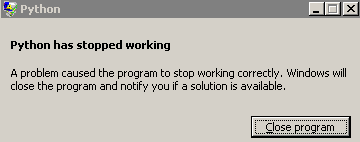
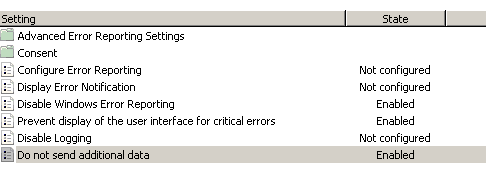
On Windows, program faults can cause an modal window to appear regarding reporting the issue to Microsoft.
This window stops automated scripts from further progress.
This is a problem for long-running programs or scripts that call other programs, perhaps on a Task Schedule.
modal Windows popup blocks programs restart
Disable Windows Reporting modal windows on Windows Pro and non-Pro by simply opening “services.msc” and disable “Windows Error Reporting Service”.
Flatpak
is a popular means to distribute software on Linux that installs and runs in a sandbox for each application.
This is particularly useful when an application needs a newer GLIBC / GLIBCXX than the system has, which is often the case on RHEL and HPC systems.
It can be convenient to open a
sandboxed shell
in a Flatpak app’s sandbox.
For example, to open a shell in the GNU Octave Flatpak sandbox:
flatpak run --command=sh org.octave.Octave
This can be useful to build further applications with CMake using a Flatpak program.
If the Git patch file is generated on a Windows computer and is copied to a non-Windows computer, the patch may fail to “git apply my.patch” on the non-Windows computer.
If the mismatches seen with “git apply my.patch -v” show question marks “?” at the end of each line, the issue may simply be line endings mismatch.
Try fixing line endings in the patch file using
dos2unix
on the computer where the patch is to be applied:
dos2unix my.patch
git apply my.patch
dos2unix is installed depending on package manager:
The
git mv
command tracks moves or renames of Git tracked files similar to the shell “mv” command.
Typically it’s useful to “glob” match patterns of files to move to avoid extra typing.
PowerShell
command substitution
is used with
Get-ChildItem
and “git mv”:
PowerShell can recursively find files like
findutils “find”
available via Microsoft
coreutils
using PowerShell function
Get-ChildItem.
The abbreviated form of Get-ChildItem is “gci”.
Typically the “-Recurse” option is used as the default is to only search the specified directory level.
Examples:
Recursively find all “*.lib” files under directory ./build:
gci -Path build -Recurse -Filter *.lib
Find all files named “example.txt” under directory ~/projects:
gci -Path ~/projects -Recurse -Filter example.txt
Open all files found above in “code” Visual Studio code:
Matlab
loadlibrary
is a straightforward way to use existing C libraries from Matlab.
In contrast, Matlab
C++ interface
takes several steps to setup and distribute, and the C++ interfaces may not be necessary, considering one may be able to use an existing unmodified C library directly from Matlab.
Other options include MEX C++ interface code, where the developer writes a wrapper function accessible from Matlab, this is relatively high performance and straightforward as well.
However, loadlibrary can be the least amount of effort and the end user doesn’t need to compile C/C++ code.
Consider the modest
example
interfacing to the C++ <filesystem> library from Matlab.
Compare that with a similar
MEX <filesystem> interface.
One doesn’t need to build a Matlab class like Ffilesystem.m for loadlibrary.
The loadlibrary approach is more general and can be used with many C libraries having C types amenable to Matlab types.
Observe in Ffilesystem.m that the user provides the path to the shared library (.dll, .so, or .dylib) that could be distributed by GitHub Release or built by the user.
Pointer in / out arguments are handled by
libpointer.
The “delete” destructor unloads the library to avoid resource leaks.
In general on any project, “shared” libraries on Windows using .DLL files have numerous caveats that aren’t an issue on macOS and Windows due to decades-old stark differences in how Windows links and runs shared libraries.
One key distinction is that Windows has no concept of
Rpath
as Unix-like OS have, which means the .DLL have to be on PATH environment variable for all shared libraries used in an executable.
This can be a key drawback for Windows shared libraries in non-trivial projects using 3rd party libraries.
In general we strongly recommend using “static” libraries on Windows, as the downsides of shared libraries on Windows are significant.
In the past year or so, GitHub Actions runners for Windows broke most “shared” library runs across projects.
The projects would run in “shared” on physical Windows machines reliably, but not on CI.
We have disabled Windows shared builds on GitHub Actions CI across all projects.