These $35 - $75 toys have been cropping up in the past year or so, highly capable, repairable, and hackable for the price.
I was curious as why I was getting much less than the specified 100 meter range from control to car.
I found some surprises and some questions as well as answers.
The control is made by Lansu, a known manufacturer of inexpensive RC servo control systems.
There are two chips inside, one had illegible labeling and was connected to handheld control inputs, while the other was connected directly to the antenna with model LT8912SRC, which I could not find on the internet.
There is no FCC ID that I could find anywhere on the unit, despite copious approval logos.
One leg attaches directly to a 4.5 cm wire monopole antenna.
On the remote, this wire was tucked down amongst other wires instead of sticking up into the antenna pipe–probably why I was getting 20 m range instead of 100 m range!
Also, for 2.4 GHz we would expect about 3cm for a monopole antenna, so we are probably fairly non-resonant, perhaps some high > 3:1 SWR affecting range.
As compared to a helicopter controller spec’d at 3dBm output power, this controller, was about 6dB stronger, so the S911 controller may be just under 10 mW EIRP.
The fix was sticking the wire up from the controller.
The factory tucked the antenna wire inside because the antenna pipe was in the wrong location!
Some disconnect between mechanical engineering and electrical engineering departments is apparent!
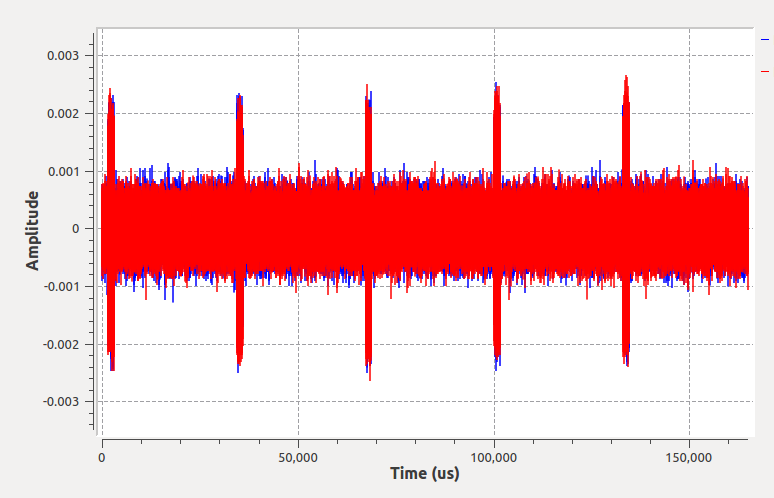
Hosim Car Radio beacons every 49 ms at 2404.3 MHz when in pairing mode, stops transmitting until no sync heard from control (out of range or control turned off). Looks like FSK.
Hosim S911 controller at 2404.3 MHz--long time 33ms period.
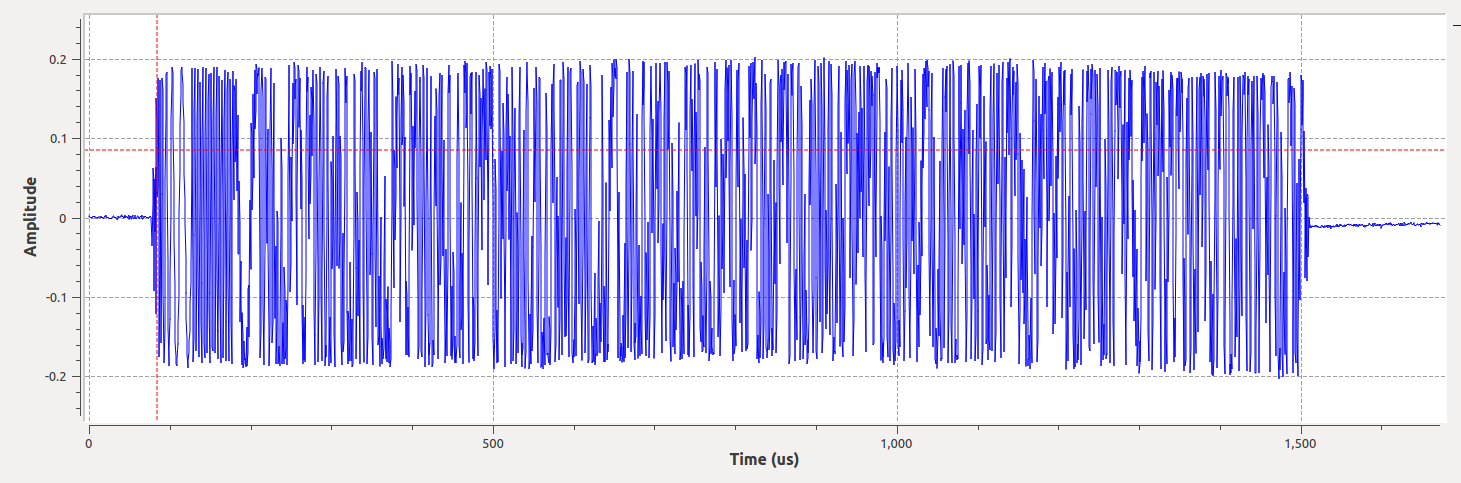
Hosim S911 controller-short time 100us preamble + 1400us message.
Hosim Controller Radio does not transmit until receiving pairing signal from car, then transmits indefinitely even without control input
Freq (MHz)
length (us)
cadence (ms)
Function
2404.3
1400
48
car sync / pair
2404.3
1500
33
ctrl sync
2422.7
1700
4,60
ctrl
2432.7
1700
20,28
ctrl
2442.7
1700
4,13
ctrl
2452.7
1700
4,20
ctrl
2462.7
1700
4,16
ctrl
2472.7
1700
4,20
ctrl
Secret unpopulated controller switch: all it does is reverse the left-right steering, perhaps to allow for different steering potentiometers.
Making Matplotlib/Seaborn plots in parallel executing threads in Python is one area where one may need to increase ulimit for files.
That is, increase the limit for the maximum number of open files.
The default maximum number of open file limits are like 1024 for Linux and 2560 for macOS.
This can lead to problems with Matplotlib like:
Too many open files: ‘/usr/share/fonts/truetype/msttcorefonts/arial.ttf’
Instead of one-off or sudo-requiring system parameter setting techniques, consider platform-independent Python.
This does not use sudo.
It instead makes temporary setting changes where feasible or at most user-profile specific system changes.
This change will be only for this instance of Python; once Python terminates even the same terminal session will have the original ulimit again.
#!/usr/bin/env pythontry:
importresourceasresexceptImportError: #Windows res = Nonedefraise_nofile(nofile_atleast=4096):
"""
sets nofile soft limit to at least 4096, useful for running matlplotlib/seaborn on
parallel executing plot generators vs. Ubuntu default ulimit -n 1024 or OS X El Captian 256
temporary setting extinguishing with Python session.
"""if res isNone:
return (None,)*2# %% (0) what is current ulimit -n setting? soft,ohard = res.getrlimit(res.RLIMIT_NOFILE)
hard = ohard
# %% (1) increase limit (soft and even hard) if neededif soft<nofile_atleast:
soft = nofile_atleast
if hard<soft:
hard = soft
print('setting soft & hard ulimit -n {}{}'.format(soft,hard))
try:
res.setrlimit(res.RLIMIT_NOFILE,(soft,hard))
except (ValueError,res.error):
try:
hard = soft
print('trouble with max limit, retrying with soft,hard {},{}'.format(soft,hard))
res.setrlimit(res.RLIMIT_NOFILE,(soft,hard))
exceptException:
print('failed to set ulimit, giving up')
soft,hard = res.getrlimit(res.RLIMIT_NOFILE)
return soft,hard
if__name__ == '__main__':
fromargparseimport ArgumentParser
p = ArgumentParser()
p.add_argument('-n','--nofile',help='max number of open files',type=int,default=4096)
p = p.parse_args()
soft,hard = raise_nofile(p.nofile)
print('ulimit -n soft,hard: {},{}'.format(soft,hard))
The choices for high power license free operation (such as for harmonic radar transmitters) are typically between the 915MHz, 2.4 GHz or 5.8 GHz bands.
Other bands are available in specific countries, for example 868 MHz is often available where 915 MHz is not available.
I do not say that you can blast across the whole band without a careful legal review of the regulations, but this page is perhaps a better place to start a marketable product than buying a 10 kW Furino marine radar at 9.3 GHz, where it’s only license-free aboard a seagoing vessel.
High power makes harmonic radar easier, and university research exemptions have led to lots of papers using marine radars, but realize such marine radar based systems may struggle mightily to legally come to market.
There have been enforcement actions against those using marine radars for “good” purposes, even far from any body of water.
Band (MHz)
EIRP (Watts) USA
902 - 928
4
2400 - 2483.5
4
5725 - 5875
4
The passive radar tags will create a useful emission at the second harmonic of the radar frequency.
Free space loss, the major limiting factor in maximum standoff distance between tag and radar, increases ~ f2 ~ (1/lambda)2
We obtain this fact by inspection of the Friis free space loss equation:
path loss dB = 20 log10((4 π d f)/c)
Therefore, all else being equal (antenna gains, power, etc.) if 915 MHz is used as the radar transmit frequency instead of 5.8 GHz, we expect
20log10(5800/915) + 20log10(11600/1830)= 32
dB less loss on the two-way path.
So assuming I can use bigger antennas (radar and tags) on 915MHz to keep the same gain as on 5.8 GHz, I can use a 1 Watt radar at 915 MHz as effectively as a 1600 Watt radar at 5.8 GHz, with regard to maximum range.
This may seem fantastic, but one would probably select an antenna for 5.8 GHz with more gain than at 915MHz, making the EIRP higher without a gigantic transmitter.
This is a strictly back-of-envelope approach, there are numerous factors to consider before selecting a frequency range for you application–contact us to discuss further.
We generally think only about the radar transmitter EIRP for unbiased tags, as the typical license-free emission limit (in the United States) of 500 uV/m @ 3 m = -41.3 dBm is easily met by the harmonic radar tag, since unbiased tags have 20-30 dB loss.
Additionally, for the United States, the FCC has determined that such tags (like RFID) are passive devices and the certification is on the radar.
For the case of biased tags, the battery is separate from the RF (there is no RF interaction due to the battery, the battery just reduces losses of the diode) and a similar FCC argument holds.
Here is an incomplete listing of countries–note this doesn’t mean you can blast your radar across the whole band necessarily, you will need to examine the particulars for each country.
Since it takes a very strong signal, typically -30 dBm or more from the radar into the tag to generate a useful return, we don’t usually find interference on the radar transmit frequency to be a large concern.
On the radar receive frequency, at the second harmonic of the transmit frequency, interference could be a concern for unmodulated radars using the 915/1830 MHz pair, since 1830 MHz is in LTE band 3.
One can select a radar modulation scheme such that uncorrelated transmissions such as LTE have a minimal impact.
For other frequency pairings, consider the types of RF environments your end users will be in.
Is is a large dock with high power X-band radars on the container ships? Is it in the vicinity of fixed microwave or satellite links?
Many times, we select what is convenient at hand for preliminary experiments, or follow on what a previous paper used.
It can be easier to prototype at lower frequencies and longer range can be achieved, but ensure your application can support the required tag antenna size.
Consider the regulations and interference environments of your target markets.
Don’t expect more than 10’s of meters range with unbiased diode tags, unless you have some specific experiments or other evidence supporting.
Reinstalling VirtualBox may fix issues with a missing kernel driver wanting to install dkms and run “/sbin/vboxconfig”.
This error usually happens when going between VirtualBox major or point releases.
It can also happen when upgrading the Linux operating system.
SVXlink
can be used as a Linux Echolink SERVER (repeater, link).
Qtel is a Linux Echolink client.
Echolink for Windows program also works very well from
WINE.
apt install svxlink-server qtel
Create “~/.svxlink/svxlink.conf” containing
[SimplexLogic]CALLSIGN= #your callsign e.g. W1AW[RepeaterLogic]CALLSIGN= #your callsign e.g. W1AW
Remote upgrading an operating system over SSH is a little risky, so it should only be considered when you accept the full risk of having to go physically to the PC and reinstall everything, possibly losing the files.
You will need an open firewall for the backup temporary SSH server enabled by the Ubuntu upgrade (port 1022?); perhaps open all ports temporarily to the IP address of your local laptop from the remote PC.