The GCC -march=native flag can cause
unexpected
and difficult to diagnose error messages on certain CPU arches, including high end Intel Xeon CPUs.
The compiler error messages generally don’t give any clues as to what the real problem may be.
While there can be a small to significant performance benefit to using the
GCC flags
enabling special features in a CPU arch, we feel it’s important to provide software that “just works” by default, even if not completely optimized for a given CPU.
The end users that care most about performance probably have already learned the appropriate flags for their CPU, and are willing to fiddle with the CPU arch flags to get the program running at optimum.
End users can provide the appropriate CPU arch flags for their system at compile time if desired like:
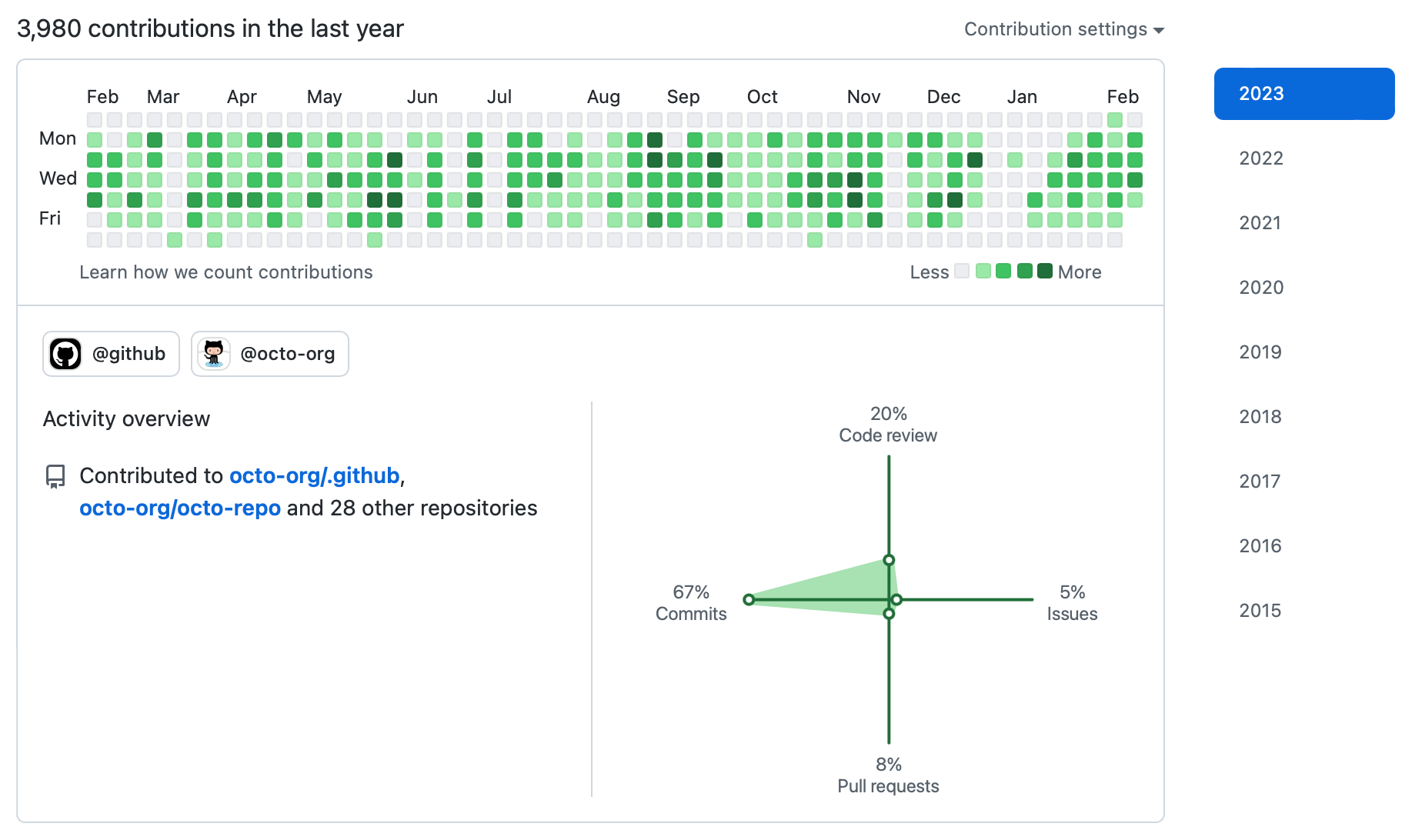
Git contribution calendars are a key way a future client, employer or colleague gets a quick glance at your individual Git contribution level.
Consider including private contributions on the profile.
GitHub and GitLab contribution metrics include more than just Git commits and the corporate versions offer deeper insights to managers.
GitHub depicts contribution types in the contribution rose:
Software is a common core skill necessary for many fields, and it’s important to show the distinction of your software work over time.
Ensure your Git commits are counted over time with the correct Git commit email configuration.
Consider using a “noreply” email address in Git repositories to avoid spam.
Git contribution credit is based on having a Git email associated with your Github account.
To avoid connection failures requiring reboot of a Windows PC upon resuming from sleep/standby,
consider disabling Windows
Modern Standby
(formerly known as Connected Standby) during sleep.
Modern Standby uses WiFi, Ethernet or other connections, periodically rousting the laptop from deep sleep to sync email and fetch updates.
Only certain PCs are capable of having network connectivity during sleep.
Some PCs lockout (make invisible) the Modern Standby option since there are firmware bugs that would keep the laptop awake (Dell XPS for example).
The option to disable Modern Standby is only present if the laptop supports it and the OEM hasn’t disabled it.
Advantages of disabling Windows Modern Standby:
save battery by not having your computer connected to Wifi while sleeping.
not connecting to possibly rogue AP as you travel about, or being subject to tracking.
some hardware (e.g. Microsoft Surface Pro) often fails to connect to Wifi on wakeup until manually going to Device Manager and disable/enable cycling the Wifi adapter.
Windows Wifi power setting is under the Control Panel → System → Power & Sleep.
If present, uncheck under “Wi-Fi” the “stay connected…sleep” options.
Check configuration: from Command Prompt, type:
powercfg /a
# which is a shortcut for:powercfg /availablesleepstates
if the response includes
Standby (S0 Low Power Idle) Network Disconnected
then the PC is set to disconnect from WiFi on sleep.
This command works even if the OEM has hidden the option in the Control Panel (like Dell XPS).
To help diagnose problems with Modern Standby, Windows provides from the factory the
SleepStudy
tool, invoked by:
powercfg /sleepstudy
This outputs an HTML report–copy and paste the filename from the Command Prompt into the web browser.
The filename is like “%WINDIR%/System32/sleepstudy-report.html”
The Windows SleepStudy report contains a great deal of nerdy but useful power system info, including battery life state.
EXFAT is a convenient format for sharing files between macOS / Linux / Windows / Android.
However, ExFAT does not support symbolic / soft links.
Operating systems have supported EXFAT for many years:
Windows: XP
macOS: 10.6.3
Linux: Red Hat 5, Ubuntu 10.04, etc.
Android: 4
However, continue to use FAT32 instead of EXFAT for test equipment (e.g. Agilent) and some older USB drive accepting printers (print direct from USB stick).
These file systems are commonly, but not universally supported across OS’s.
NTFS: macOS (including macOS 10.15 Catalina): NTFS is read-only by default.
Android needs additional third-party software for NTFS
FAT32 is readable by Windows / macOS / Linux / Android, but is limited to 4 GB file size.
With many USB HDDs over 2 TB, you would have to break up your HDD into multiple partitions for FAT32 – quite inconvenient.
You could use FAT32 for a small USB flash drive.
For old printers “USB Direct Print” it may be that only single partition FAT32 is supported.
Keep a small USB drive formatted to FAT32 for this purpose.
ExFAT is generally the best choice for universal support on USB HDD.
For USB flash thumb drives and SD cards, I format most to ExFAT.
Keep a small flash drive formatted to FAT32 for the USB port on old USB direct print printers.
For Linux kernels older than 5.4, or for arches where the Linux distro didn’t include ExFAT in the kernel, you may need to use FUSE ExFAT support:
Hugo can have 100x faster build times than Jekyll.
Hugo offers a more powerful design experience.
We recommend Hugo in general for fast, HTML5 standard compliant and robust static site generation.
Select a Hugo theme and clone the theme into the site.
We use “hugo-flex” theme–we have an example hugo-flex template.
cd ~/myHugoSite

git submodule add https://github.com/ldeso/hugo-flex themes/hugo-flex
Enable the theme by adding to hugo.yaml a line:
theme:hugo-flex
Hugo Markdown parsing may use different default options or parser than Jekyll.
As a result, you may need to manually fix pages’ Markdown syntax.
You may need to rewrite the internal page links to categories and tags, something perhaps like:
find content -type f -name "*.md" -execdir sed -i 's,](/category/#,](/categories/,g' {} +

find content -type f -name "*.md" -execdir sed -i 's,](/tag/#,](/tags/,g' {} +
To convert options you might see in examples between TOML and YaML etc. consider this
web converter.
Sometimes minor updates to a blog post are made without wanting to change the main posted date of the article.
To have this update time reflected in the article metadata, telling search engines the “freshness” of the article, enable the last updated metadata from Git commit time by adding to hugo.yaml:
enableGitInfo:true
It’s typically beneficial to set a limit to the number of posts in the site RSS feed.
This can speed the site build by a factor a 10 for large sites, and improve the update speed of search engines.
Check that the RSS limit is working by checking localhost:1313/index.xml from the site preview hugo serve -O.
In hugo.yaml:
rssLimit:10
To disable RSS for taxonomies (tags, categories) that aren’t useful for many site, additionally add to hugo.yaml:
outputs:taxonomy:- HTMLsection:- HTML
A key design pattern in Hugo is overriding theme files without editing the theme files themselves that are in a Git submodule.
Use the lookup order for
partials
and
templates.
This will keep your web design clean, minimal and DRY.
Redirect page URL with Hugo front matter tag
aliases,
equivalent to Jekyll
redirect_from.
The Surface Go should be considered against entry-level Surface Pro.
Surface Pro 7 has proportionately more capability than the Surface Go 2 vs. cost.
The benchmarks and
initial reviews
of the Core m3 2020 Surface Go 2 are favorable.
The Surface Go is adequate for video conferencing as long as you’re not using other programs at the same time.
While headsets are better for any laptop, the built-in array microphones of the Surface Go and Surface Pro 7 are good for videoconferencing.
The Surface Go generally seems to have a great array microphone.
It is relatively straightforward to dictate using Windows Voice Commands to compose text with the Surface Go.
This is accomplished in general by pressing
⊞+h
in any application, bringing up a dictation bar.
Windows voice dictation accuracy is OK, but is not nearly as good as Android’s voice typing system.
The Surface Go can be charged at least in three ways, which we find quite flexible:
OEM 24 watt (Surface connector)
USB-C PD to Surface connector adapter (need 15 volt USB-C PD adapter, works with other Surface devices also)
USB-C PD 18 watt or higher charger
The Surface Go is fine to play video at the full screen resolution.
The web browser is a bit slower on the 2018 Surface Go than on a mid-range laptop priced 3 times higher than the Surface Go.
If one is building code and running simulations, those will feel slower on the Surface Go, like a 5 year old laptop would feel.
Since at least 2018, the creative work tablet market has had Windows and Linux devices as a great choice.
Features to consider in a tablet for creative work include:
Windows or Linux OS instead of iPadOS or Android
cost $500-700
microSD slots to expand storage cheaply
128 GB SSD instead of too-small 64 GB (unless you know a microSD card is fast enough for the work)
Inexpensive tablets in general suffer poor display resolution and slow CPUs.
Windows laptops with 5G wireless are available, but with mobile phone hotspot plans commonplace, it may be more feasible to not get specific 5G laptops.
Whatever tablet one is considering for creative work, don’t neglect the ~ $100 keyboard price.
Windows tablets are generally well-suited for creative STEAM work.
Typically look at last year’s models (new, and especially refurbished) to get them at about half the price of this year’s models.
For refurbished electronics, the “bathtub curve” of early failure has already been worked out.
As on Linux, it’s possible to select the audio source and sink on a per-app basis.
This interface is buried in Windows control panel.
The current name is “App volume and device preferences”.
You can set the volume, source (input) and sink (output) for each app.
This is helpful say when an app where one-way high fidelity audio is desired instead defaults to two-way low fidelity audio.
Also, modern Bluetooth devices may have the ability to use two-way audio with high fidelity listening by using A2DP for output with headset microphone input.
There are some very important distinctions between analog & digital trunked radio systems, all of which use
FDD
(frequency division duplexing) and LTE networks, which use FDD or
TDD
(time division duplexing).
For TDD LTE systems, surprising cases of long distance interference are possible due to super-refraction caused by tropospheric ducting.
Other sources of anomalous propagation are important and exhibit frequency dependence as well.
The shortest path may not be the path traveled–implications for optimistic terrain-shielded frequency reuse.
Dual-frequency 240MHz + 2GHz 50km & 140km oversea paths
sometimes 240 MHz does better and sometimes 2.015 GHz propagates better!
240 km LTE interference between Korea and Japan
50 Watt base stations contend with 0.2 Watt devices.
Base station to base station power was nearly -90 dBm over 240 km!
FM and TV broadcasts have long been known to be subject to tropo ducting.
A main motivation to move FM from low-band VHF (42-50 MHz) to 88-108 MHz was to get away from sporadic-E ionospheric skip, which could lead to far more interference from hundreds to thousands of kilometers away along with tropo ducting.
Of course, other transmission modes like aircraft AM are also subject to tropo ducting.
The rise of FM translators has made the general public more aware of tropo ducting, particularly as over the air TV audiences have dwindled, and HDTV limits visibility of interference.
VHF tropo ducting has been known for decades from Hawaii to California–a 4000 km path.
However the antennas required are large and the signals are weak.
In summers repeaters 150 km away can be heard almost every day at certain times of day.
On some days the 150 km distant repeaters were so strong you could hear them on an indoor desktop scanner with internal antenna!
Whether trunked or conventional, the impact of ducting on your VHF system depends on the signal ratio desired/undesired, which should be > 21 dB in a 12.5 kHz analog system.
If two stations wishing communications are more than 50 km (base-base) you may have some issues with ducting interference.
This gets trickier in places like New England with a long highly-populated irregularly shaped coast.
The interference on the repeater input can be the issue, especially with high-power base stations accessing repeaters.
These distant base stations can “jam” portable units into the repeater.
Possible resolve: check other user license.
Are they keeping to legal EIRP/antenna height for their control stations?
DMR: MotoTRBO will change to a new Rest channel “Adaptive Rest Channel Rotation” if interference is detected on the current Rest channel.
DMR uses 16 digital “color codes” 0-15 to distinguish co-channel systems.
The 150 km dual-slot repeater limit (perhaps 135 km in practice with finite precision radio timebases) is a near-far limitation for DMR when both time slots are in use as described by
DMR standard ETSI TS 102 361-1
in 10.2.3.1.3.
There is a 2.5 millisecond guard time between inbound time slots to allow for power amplifier ramp up/down and propagation delay.
This should allow for a 750 km path noted in Figure 4.4 of the ETSI TS 120 361-1 standard between the radio and the DMR repeater less the delay of the radio itself.
In practice, RF propagation losses would limit communications range before the guard time limit is reached.
I am not aware of any experiments testing this limit in the field as it would take an airborne or spaceborne platform to test in the absence of tropo ducting or other enhanced propagation.
For DMR simplex with no near-far issues and single-slot operation, there is virtually no known timing concern, just the usual RF propagation loss issues.
Tropo ducting of UHF (450MHz) including GMRS is less common than on VHF, but can equally interfere with commercial users when it happens.
We have experienced 300 km distant repeaters on an omni base antenna.
Tropo ducting was a plague when UHF trunking came into vogue on 12.5 kHz “split” channels because for years before, low power mobile operation had been permitted on the repeater input (455-460, 465-470) MHz range.
Of course, pretty soon people put base stations on those frequencies and we had to threaten FCC action to get them to stop.
Repeater panels would mark those channels as “last-used”.
Be careful when planning a new trunked system so that the “home” or “collect” frequencies are not plagued by these legacy operators.
LTR trunking on any band has only a single bit “area code” to distinguish co-channel systems.
Perhaps once every year or two where due to tropo ducting a customer would hear someone else on their area code, repeater and talkgroup on LTR.
LTR systems are being rapidly replaced with DMR systems, so these problems hopefully won’t be relevant too much longer.
For 5 kHz FM deviation analog systems 21 dB D/U is required for good audio quality in the presence of tropo ducting.
800 MHz two-way radio especially suffered from tropo-ducting for co-channel Nextel and two-way radio systems.
A customer was 40 km from the repeater with an omni base antenna would experience several hours per year when they could not access the SMR LTR system on 800 MHz due to tropo skip.
A MultiNet II 800 MHz trunking repeater system would sometimes hear tropo skip on the input frequencies.
For Motorola analog Privacy Plus trunking and AMPS cellular phones, the very limited number of connect / SAT tones meant that after a call was established, an undesired signal could bleed through on Privacy Plus trunking systems or AMPS analog cellular.
Privacy Plus control channels rotate every day (and could be manually encouraged to do so earlier).
900 MHz two-way radio systems are still operating, including 33 cm ham radio.
The nature of 900 MHz propagation made them a little less prone to interference from tropo skip, including fewer systems on 900 MHz overall, despite the 12.5 kHz bandwidth (21dB D/U instead of 17dB D/U required for good audio 12.5 kHz vs. 25 kHz).
The coverage is not as good on 900 MHz as 800 MHz because 12.5 kHz analog FM suffers a 4 dB impairment relative to 25 kHz bandwidth analog FM.
The radio technology available at the time of early 900 MHz systems was a bit rudimentary by even year 2000 standards.
The mobiles had trouble holding frequency accurately, microphonics were more of an issue, and different radio models had distinct compandoring parameters.
Anterix got FCC Report and Order
17-200
authorizing broadband LTE on 900 MHz, which added a more dynamic RF environment.