Windows GCC availability
GCC (including G++ and Gfortran) on Windows is available via several means.
We generally prefer MSYS2 for using GCC and numerous libraries with pacman package manager.
GCC (including G++ and Gfortran) on Windows is available via several means.
We generally prefer MSYS2 for using GCC and numerous libraries with pacman package manager.
Permuting and transposing array dimensions are a common operation used in data analysis. Ideally these operations would be done with index tricks instead of copying arrays. In Matlab, these operations copy the array (slow, expensive). In Python, these operations are O(1) an index manipulation creating a new view into an array (fast).
In Matlab, transpose and permute are distinct methods. In Matlab, transpose() is strictly for 2-D matrices, while permute() is for reordering dimensions of N-D arrays.
In Python, xarray and Numpy arrays are popular.
Both use the .transpose() method for N-D array dimension reordering–there is no separate “permute” method.
However, the syntax is distinct between xarray and Numpy.
xarray.Dataset
and
xarray.DataArray
have a .transpose(*dims) method.
# A.dims == ('x', 'y', 'z')

B = A.transpose(('z', 'y', 'x'))

# this is equivalent
B = A.transpose('z', 'y', 'x')

# B.dims == ('z', 'y', 'x')
Numpy transpose can also permute by specifying a tuple of the desired order. Omitting the axes order argument simply reverses the order of the axes for N-dimensional arrays.
B = A.transpose((2,1,0))

D = C.transpose()The latest CMake release may be installed by any one of:
winget install Kitware.CMakepip install cmakeThe CMake build process is the same across operating systems and compilers:
cmake -S myproj -B myproj/build

cmake --build myproj/build

cmake --install myproj/buildOn Windows, CMake defaults to Visual Studio and Nmake, which may not work on some projects. Ninja build system with CMake is generally faster to build and particularly rebuild regardless of operating system. Ninja on Windows solves numerous issues vs. GNU Make. Ninja works with Visual Studio as well.
Override the default CMake generator by setting environment variable
CMAKE_GENERATOR=NinjaCMAKE_GENERATOR can be overridden (e.g. to use GNU Make from MSYS2) like:
cmake -G "MinGW Makefiles"Older CMake on Windows may get the message below. Fix by upgrading to CMake ≥ 3.17.
sh.exe was found in your PATH

For MinGW make to work correctly sh.exe must NOT be in your path.
Run cmake from a shell that does not have sh.exe in your PATH.
If you want to use a UNIX shell, then use MSYS MakefileA common numerical operation is cumulative summing.
The cumsum() operation has the output array of the same shape as the input array, with each element as the sum of all the previous elements in that dimension.
Matlab
cumsum
and Python
numpy.cumsum
operate quite similarly.
When translating code between Matlab and Python, as always keep in mind Matlab’s one-based indexing vs. Python’s zero-based indexing.
That is, when using cumsum() over an axis, be sure to select the correct axis.
Matlab cumsum(..., 1) is equivalent to numpy.cumsum(..., axis=0).
These examples are equivalent. Suppose input:
x = [2, 3, 5, 8]Matlab:
y = cumsum(x)
y =
     2     5    10    18
Python:
y = numpy.cumsum(x)
>>> y
array([ 2, 5, 10, 18])When working with large grids, the grid itself can consume considerable memory. Large grids can require more advanced techniques like working with interpolants and using sparse grids. Many grids that aren’t too large can use common functions like “meshgrid” to make certain plotting or linear algebra operations easier. Matlab and Python (Numpy) can readily work with these data structures. We show the differences and similarities to allow understanding and translating code between Matlab and Python.
Matlab meshgrid and ndgrid generate distinct data for the first two dimensions, but other dimensions remain the same. This is due to meshgrid() being intended for plotting, and ndgrid() intended for matrix operations.
[x,y] = meshgrid([1,2], [1,2])

x =
     1     2
     1     2

y =
     1     1
     2     2
[x,y] = ndgrid([1,2], [1,2])
x =
1 1
2 2
y =
1 2
1 2Numpy is used for most array computation in Python–many Python numerical libraries use Numpy internally.
Numpy has additional advanced grid generation functions numpy.mgrid() and numpy.ogrid()–here we will focus on
numpy.meshgrid.
numpy.meshgrid also has copy=False and sparse=True options that allow conserving memory.
For simplicity, we will use the defaults, which is a dense copied mesh.
Equivalent to Matlab meshgrid():
x,y = numpy.meshgrid([1,2], [1,2], indexing='xy')

>>> x
array([[1, 2],
       [1, 2]])
>>> y
array([[1, 1],
       [2, 2]])
Equivalent to Matlab ndgrid():
x,y = numpy.meshgrid([1,2], [1,2], indexing='ij')

>>> x
array([[1, 1],
       [2, 2]])
>>> y
array([[1, 2],
[1, 2]])A recent PyHC presentation given by Ian of US-RSE had a discussion where a few journals relevant to publishing research software were noted. We have used engrXiv for software preprints. Refereed journals include:
When using Intel oneAPI compilers on Windows, you may get a message like:
INTERNAL ERROR: pgopti_Create_Full_Path: buffer too small
This is probably caused by a filepath that’s more than 139 characters. You may not see the paths printed as being that long, because CMake with Ninja does preprocessing on each Fortran file that lengthens the filename.
The fix is to make the project paths shorter. Users may have to build code from a directory nearer the top of the filesystem hierarchy.
ExFAT is faster than NTFS by up to several percent
hard drive write speed.
ExFAT allows a hard drive to easily be
read across operating systems.
Windows Subsystem for Linux can
read ExFAT
drives.
Formatting a disk deletes all data on the drive.
The system hard drive %SYSTEMDRIVE% for Windows OS MUST be NTFS.
NOTE: If the hard drive is unformatted, it will not have a drive letter. Once sure the drive is empty or want to erase the contents to make it ExFAT, do this through Disk Management.
Format a drive to ExFAT from Windows Explorer by right-clicking on the drive to format and selecting “Format” → File System: “ExFAT”
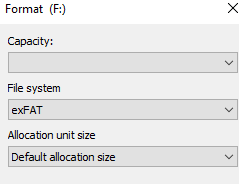
Alternatively, format a drive to ExFAT from Command Prompt or PowerShell by:
format driveletter /FS:exFAT /QFormat a drive to ExFAT from Disk Management by running diskmgmt.msc and right click the new drive → Format.
If NTFS is the only option, use Windows Explorer to format to ExFAT after first formatting to NTFS here.
Switching to CMake from autotools or plain Makefiles gives generally better support of many operating systems, in particular Windows. Another benefit is generally faster speed of configuration and build. In 2020, MonetDB switched from autotools to CMake. They observed MonetDB with CMake builds in 40% of the original time. Note also the improvement due to Ninja instead of GNU Make.
We have converted a number of projects from autotools to CMake. Consider automated autotools to CMake script and then manually compare or redo by inspection of the autotools scripts.
In general, livestream data bandwidth depends on the video content (lots of motion vs. talking head) and wireless conditions.
YouTube Live has a wide range of livestreaming modes. Consider 480p to start to keep the connection from dropping out, with data bandwidth of 500 - 2,000 kbps ~ 16 Mbyte/minute. Use variable bitrate to dramatically reduce upload bandwith needed for typical livestreaming scenes. OBS Studio is among streaming software supporting HLS for ease and robustness or low latency RTMPS.