In addition to
generic
and
polymorphic
procedures, Fortran also allows aliasing procedure names.
This is useful to provide a shorter or more convenient name for a procedure.
It’s easiest to understand from the example below.
programmaininterfaceeasyprocedure::long_and_descriptive_procedure_nameendinterfacecalleasy()containssubroutinelong_and_descriptive_procedure_nameprint'(a)',"Hello from long name"endsubroutinelong_and_descriptive_procedure_nameendprogram
Matlab Engine API allows calling Matlab functions from Python code.
These commands are executed from Terminal, not from Matlab.
Go to the Matlab Engine directory to setup Matlab Engine, where “python” starts the desired Python executable.
importmatlab.engineeng = matlab.engine.start_matlab('-nojvm')
y = eng.asin(1.)
eng.quit()
The Matlab Engine should take about 1 second for Matlab Engine to start when called from Python.
For Matlab functions requiring JVM remove the “-nojvm” option.
Many Matlab numeric classes (single, double, logical) can be converted to Python types like:
numpy.asarray(x)
Python floats pass into Matlab Engine by including a period . after the number.
asin(1) fails
asin(1.) works
Python can pass N-dimensional arrays to Matlab.
Matlab Engine provides asynchronous call with
background=True
PDCurses is a long-standing Curses terminal graphics library for which we provide
CMake build script
that works across operating systems including Windows, Linux, macOS and DOS.
X11, SDL2 and Windows console backends are supported.
CMake environment variable
CTEST_PARALLEL_LEVEL
controls default test parallellism to save test run wallclock time.
CTEST_PARALLEL_LEVEL=0 uses unbounded test parallelism.
If the computer runs out of memory or has conflicts with parallel tests, use
fixtures and resource locks
to control test run parallelism on a per-test basis.
CTest parallel somewhat randomizes the order of the tests.
ctest –schedule-random
randomizes the order of tests even for serial test runs.
This example run on a 4-core machine shows that no extra command line parameters are needed to use CTEST_PARALLEL_LEVEL:
By default, macOS keeps USB ports constantly providing power while in sleep mode, which can run down the laptop battery if a USB device such as a docking station is plugged in without a power adapter.
pmset
macOS command utility can set USB ports to power-off when the lid is closed.
This works by putting the laptop into hibernate mode, which makes the laptop wake up a few seconds slower than the standard sleep.
Test this by pushing the power button or closing the laptop lid.
Wait a minute to see if the USB device loses power.
A USB power analyzer (volt meter) can be used to check the USB port power as well.
The 10 meter ham radio band has a suggested FM calling frequency of 29.6 MHz, which is nestled among the repeater frequencies.
With a dedicated 10 meter FM band antenna tuned for the 29.5 - 29.7 MHz range, this works fine.
However, many 10 meter operators primarily use CW, data, SSB, and similar modes in the 28.0 - 28.5 MHz range.
Most popular 10m antennas such as a dipole antenna or 1/4 wavelength vertical antenna tuned for say 28.3 MHz may have an excessively high SWR at 29.6 MHz.
Operators using inexpensive converted 27 MHz CB radios may not be able to tune the non-5kHz offset channel.
That is, they might be able to tune to 29.605 MHz, but not 29.600 MHz.
The 10m AM mode calling frequency is generally 29.0 MHz, which is much closer to the 28 MHz SSB/CW frequencies.
This allows more efficient use of the same antenna for both 10m SSB/CW and AM.
An AM channel offset as much as 5 kHz can generally still be heard by another AM receiver, but with reduced signal efficiency.
10 kHz AM channel spacing is generally adequate for AM radios (as observed by CB radio channel plans and MW AM broadcast plans).
It is worth considering a “new” FM calling frequency near but just above 29 MHz with a 5 kHz offset to address using inexpensive converted CB radios and more optimally using the same antenna as for 28 MHz SSB/CW.
We suggest considering 29.055 MHz as a new 10 meter FM calling frequency.
This is far enough away from the AM calling frequency of 29.0 MHz and typically working frequencies just above 29.0 MHz.
In this table, the “converted CB channel” assumes common export radio
channel charts.
The specific radio may have a different channel number for the same frequency.
We’ve put in a possible “new” AM calling frequency of 29.005 MHz for converted CB radios, if such would be desired.
The jump in channel sequencing from channels 23, 24, 25 is a de facto standard.
In 2017, WT Docket
10-119
modernized FCC 27 MHz (11 meter) CB Radio Rules as published in the
Federal Register,
including replacing
95.333
and
95.933.
The obsolete Part 95.413 rule limiting legal CB radio communications to 250 km was removed.
This was one of the largest improvements to CB radio rules since the late 1970s, recalling the June 1, 1976
White House Conference on CB Radio.
CB Radio rules do not specify a maximum range for CB radio communications, as long as the other station is in the United States or Canada.
Therefore, “DX”, two-way long distance communication typically using non-groundwave
propagation
such as skywave, meteor scatter, etc. is legal for USA CB radio operators with other CB radio stations in the United States and Canada.
At dusk/dawn, a form of skywave propagation known as greyline propagation can occur, allowing strong signals between distant stations within the same dawn/dusk region as seen on this
live map.
If propagation is enhanced but no station is transmitting on the frequency one is listening to, the propagation enhancement is not noticed.
Like on other frequency bands, listening for known transmitters is a useful DX detection technique in the 11 meter band.
For example:
Broadcast Auxiliary Remote Stations (STL), what FCC ULS calls “RP - Broadcast Auxiliary Remote Pickup” can be heard around
26 MHz
including 26.470 MHz.
27.025 MHz CB
radio channel 6
in the AM mode is a common frequency for CB DX with very high power stations.
12 meter and 10 meter
NCDXF beacons
provide another source of live propagation detection, especially for seeing if the
MUF
is near the 11 meter band.
International DX groups may use calling frequencies including
SSB 26.285 MHz, FM 26.805 MHz, and SSB 26.555, 27.415, 27.555 MHz,
but these frequencies are generally not legal to transmit on.
From the early 1990s and continuing today, REACT International holds
itinerant FCC licenses
on 27.490 MHz among numerous other VHF and UHF frequencies for emergency communications.
Specifically, the REACT FCC callsign WQUS415 authorizes 150 watts transmit power on 27.490 MHz with narrowband FM (11K2F3E) and SSB (2K80J3E) voice modes.
Commercial business band two-way radio transceivers generally “bottomed out” their frequency coverage around 30 MHz for at least three decades.
Thus the users of such frequencies would either have custom-designed radios, modified CB radios or modified ham radios, or marine / LMR HF radios.
We’re not addressing the FCC type approval vis the license class, but it’s clear there are technically viable and currently sold options for 100+ watt SSB and FM operation on 27.490 MHz for such licensees.
Such radios on the commercial market include:
Determine free space on Linux / macOS / Windows Subsystem for Linux with "
ncdu.
ncdu uses Ncurses terminal graphics to quickly show the biggest files in the Linux filesystem tree.
ncdu is very handy to find large files or directories that may be unneeded.
df -h
gives a drive-level summary of disk usage.
Package managers cache installed files in case of need to reinstall, but the packages can be redownloaded if needed to save disk space by clearing the cache.
Clear the package cache–for
APT
(common in Debian-based systems):
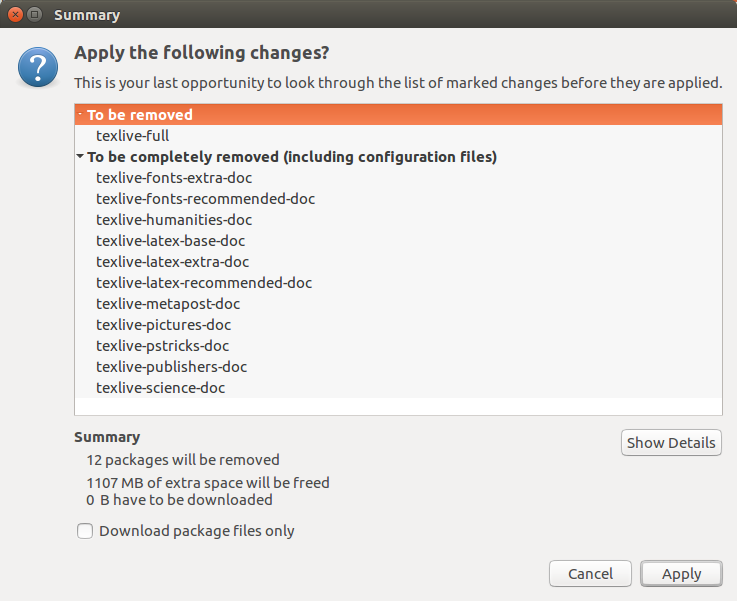
TeX Live documentation can consume a lot of disk space.
To cleanup the documentation, consider removing packages matching texlive-*doc.
This also removes texlive-full but with no detriment to TeX Live working.
Packages removed for texlive-doc to save over 1 GB of disk space.