CMake target dependency graph
CMake
--graphviz
can generate GraphViz target dependency graphsfor CMake-supported project code languages including C, C++, and Fortran.
Fortran executables and modules are shown in the directed dependency graph.
The
“dot” GraphViz program
converts the .dot files to PNG, SVG, etc.
dot program is
available by:
- Homebrew:
brew install graphviz - Winget:
winget install -e --id Graphviz.Graphviz
Generating the dependency graph requires CMake configure and generate. Thus, the compiler and generator needed by the CMake project must be working. The project does not need to be compiled before generating the dependency graph. However, the user should select the same CMake configure options as they would for compiling the project.
Example: MUMPS dependency graph is below. SVG vector graphics can be zoomed arbitrarily large in a web browser. The “graphviz/” directory is to avoid making files in the source directory.
cmake -B build

cmake --build build -t graphviz
using script in CMakeLists.txt like:
find_program(GRAPHVIZ_DOT NAMES dot)
if(GRAPHVIZ_DOT)
    file(MAKE_DIRECTORY ${PROJECT_BINARY_DIR}/graphviz)
    set(_graph_name ${PROJECT_BINARY_DIR}/graphviz/${PROJECT_NAME})
    add_custom_target(graphviz
      COMMAND ${CMAKE_COMMAND} --graphviz=${_graph_name}.dot -B${PROJECT_BINARY_DIR} -S${PROJECT_SOURCE_DIR}
      COMMAND ${GRAPHVIZ_DOT} -Tsvg ${_graph_name}.dot -o ${_graph_name}.svg
      COMMAND ${CMAKE_COMMAND} -E echo "CMake ${PROJECT_NAME} targets graph: ${_graph_name}.svg"
    )
endif()
Another example is the h5fortran project graph:
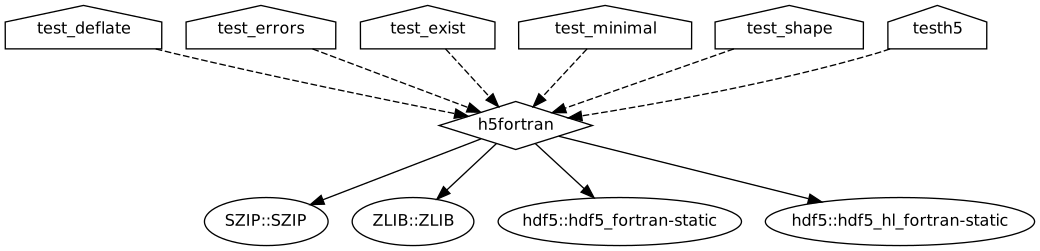
h5fortran dependency graph
The “dependers” files show only the nodes depending on a node.
Scripts and Viewing output
CMakeUtils graph.py converts a directory of CMake dot diagrams to SVG or PNG and collects them in an HTML document for easy viewing:
python cmakeutils/graph.py ~/myprog/graphviz/To open a web browser from the Terminal:
python -m webbrowser -t file:///$HOME/myprog/graphviz/index.htmlNote that “file:///” has three slashes and the file path must be absolute.
Related: Dependency graphs are also easily created in Python and Matlab.